
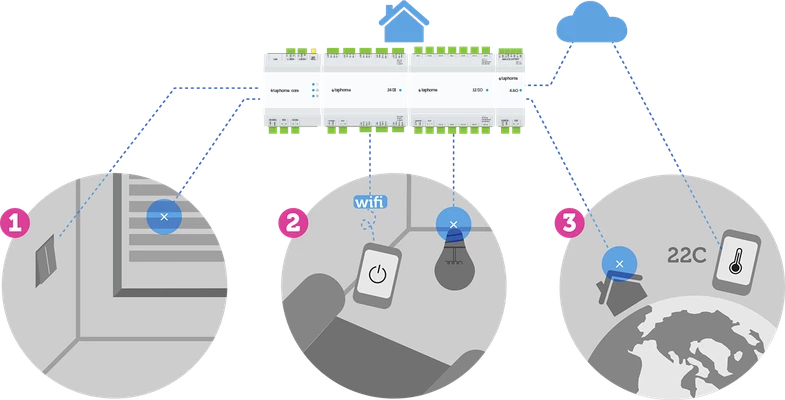
Key Features
- All ‘on-site’ operations are fully independent from network or internet connection.
- When user is connecting from local network, all communication between mobile phone / tablet and control unit is performed within local network. Fully independent from internet connection.
- When user is connecting remotely (outside LAN) TapHome Cloud server is used to initiate and securely forward data between user and control unit (public IP address is not required). All decisions are left on control unit. Also, it is possible to setup remote connection without using TapHome servers.
TapHome account vs. local account
TapHome Accounts
TapHome accounts are the preferred way to connect to a location. It logs in with an email and password, authentication is performed by the TapHome cloud server, which also returns a list of locations that the account has access to. A TapHome account can have remote access to a location enabled or disabled.
Local Accounts
Local accounts are predefined by the device owner and can be reused, e.g. Hotel room. e.g. admin / admin, room432 / uQ492i. Authentication takes place directly in the control unit, so this login method will work independently of the TapHome cloud servers. Local accounts are denied remote access to the site. In practice, local accounts are not of much use.
For more info check Users and Permissions: https://taphome.com/sk/support/85721089
Online vs Offline
TapHome provides the best of 2 worlds: fully functional and autonomous in offline mode and zero-configuration and safety of remote access via cloud.
Local connection
When both the user and the control unit are in the same local network, all communication takes place without any servers or Internet access.
| Mobile app | No intermediate server | Control unit |
|---|---|---|
| ← Direct communication → |
Mobile app:
- Listens to broadcasts of control unit to quickly connect to it, even if its IP address was changed
- HTTP socket, Port 80
Control unit:
- Control unit broadcasts its identification data for fast detection for apps in local network
- Port 80
- IP address can be obtained by router via its DHCP service or manually as static IP via TapHome application or static IP address reservation on router side
- Possible to create autonomous remote access using Dynamic DNS, Static IP or VPN
Remote access via tunneling server
The tunneling server provides a secure Internet bridging (tunnel) between the application and the control unit - if they are not located in the same local network. No data is stored on this server.
Mobile app outside LAN
| Mobile app | Microsoft Azure Cloud | Control unit |
|---|---|---|
| → TUNNELLING SERVER ← |
App outside local network initiates safe connection with tunnelling server
- HTTPS socket, port 443
- SSL encryption
Tunnelling server features
- Provides basic authentication
- Minimalistic infrastructure, therefore costs are extremely low and this service can be offered for free
Control unit initiates safe connection with tunnelling server
- HTTPS socket, port 443
- SSL encryption
- Not visible on internet, therefore lower probability of internet attack
First login with TapHome account (email and password)
→ TapHome API SERVER
- Authentication of email and password
- Get list of available locations
The controller has the final say on accepting or rejecting the connection from the TapHome account.
Firewall settings
Recommended settings
Allow outgoing TCP connections from Taphome Core to all IPs (all ports)
Minimum settings
Allow outgoing connections from Taphome Core to:
TCP
- http://cloudapi.taphome.com (port: 80, 443)
- http://tunnel1.taphome.com (port: 80, 443)
- http://tunnel2.taphome.com (port: 80, 443)
- http://TapHomeUpgradesCore.azurewebsites.com (port: 80, 443)
- http://coreupgrade.taphome.com (port: 80, 443)
- http://miscutils.taphome.com (port: 80, 443)
- http://miscutils.azurewebsites.com (port: 80, 443)
NTP
Storage of historical data
When you enable storing of values or statistics of specified devices, short-term data are stored inside control unit for a limited time. If control unit is connected to internet, it collects the data, optimizes it and sends it to Storage Cloud Server.
Data Storage Duration
| Offline | Online | |
|---|---|---|
| Instant values | up to 5 hours | Unlimited |
| Hourly statistics | up to 7 days | Unlimited |
| Daily statistics | up to 365 days | Unlimited |
Advantages of a cloud backend
- No IP address setting required, no need to change router settings
- If the ISP replaces the router, no configuration change is required in TapHome
- Internet security - the IP address of the controller is not visible from the public internet
- Reliable servers with global availability - TapHome uses Microsoft Azure, one of the world’s top cloud service providers.
TapHome provides cloud backend for free.
Privacy
Data is only stored in the cloud if a TapHome account is used and the user has enabled the history of device values. In this case, the data is linked to the account name.
The account name can be a random text, a virtual email or a real email. The only situation in which stored statistics can be linked to a person is if the account name is a real email and contains the user’s name.
Service server
OPTIONAL
- Update the Linux components of the control unit
- Automatic bi-weekly deposits
- SSH encrypted connection, port number: random (unprivileged)
- DNS: service.taphome.com
Alternative connectivity scenarios (optional)
Setup static IP Address Manually via TapHome Application (version 2019.x and above):
- Go to Settings → My Location → Network Setting → uncheck Enable DHCP.
- Type new static IP for Core. You can also edit Network mask, gateway and DNS Server. Please make sure that new static IP address is out of range of dynamically assignable IP addresses used by router.
- Confirm changes by “Save network settings and restart” button. After restart the new settings become working.
Set static IP address in DHCP settings of the router and use Dyn DNS service to connect directly:
- Go to router settings and create DHCP Static IP reservation for TapHome Core. For this option TapHome Core mac address is required.
Other:
- VPN can be used as well
- Core can be completely disconnected from local network and it would be controlled with light / blind switches or Multi-zone Controller.