For better diagnostics of the TapHome bus, use Bus analyzer in Settings → Hardware → TapHome Bus.
⚠️ Warning: The bus analyzer uses extensive communication with modules, which may slow down normal operation. After properly closing the bus analyzer or the TapHome application, the analyzer will no longer be active.
Overview
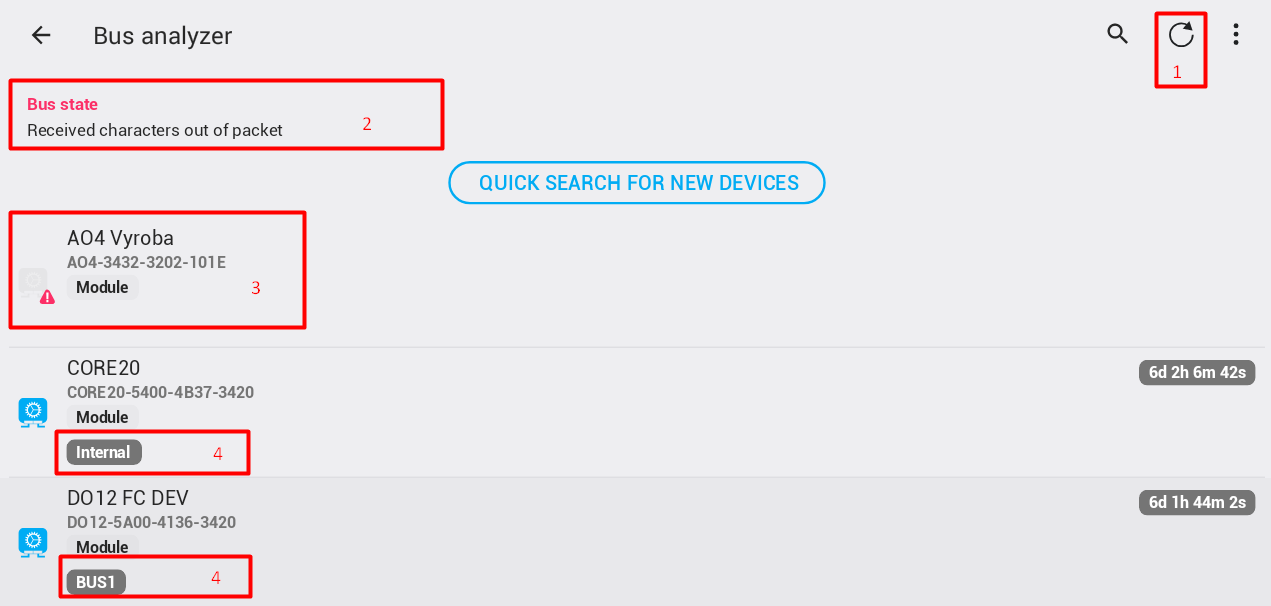
- Refresh error statistics
- If there are errors on the bus, they will be displayed here.
- Modules that have never communicated have no statistics.
- Information about the physical bus to which the module is currently connected.
Error indicators
- If communication with a module is faulty – the module does not respond – the information is displayed in red.

- If there were communication problems, but the module now responds correctly, the errors are displayed in green.

- If there is unexpected information related to a module – for example an unexpected reset – it is displayed next to the module name in red.

- If the module uptime is more than 30 seconds, but less than 2 minutes, it is displayed in green.

- If the module uptime is less than 30 seconds, it is displayed in red.

After two minutes from startup, the uptime is displayed in gray.
Actions
Refresh error statistics
Clicking the Refresh error statistics button clears all module communication errors from memory and starts gathering new statistics. This can be used after identifying problems to focus only on new errors that appear on the bus after this step. If the statistics are not reset, every time the bus analyzer is started, errors from communications prior to its start will also be displayed.
Pause and Resume
It is possible to Pause the bus analyzer and check the current state without changes. To do this, click the button. To refresh the live view, use the Refresh button.
Quick search for new devices
The bus analyzer enables a quick search for new devices. When started, only one cycle of searching for new devices is performed – in normal mode, three cycles are performed.