The settings described on this page are necessary for the proper functioning of the Smart Rule “Blinds adjustment according to sun ”.
Sun orientation setup
Open the Service settings of the blinds or a sliding shading element and locate the SUN ORIENTATION section.
| Attribute | Default values | Usage |
|---|---|---|
| Azimuth of the window | 180º | Smart Rule Blinds adjustment according to sun |
| Window height | 2m | Smart Rule Blinds adjustment according to sun , Blinds level setting enabled, Mode “Depth of sun ray ” |
| Distance from floor to window | 1m | Smart Rule Blinds adjustment according to sun , Blinds level setting enabled, Mode “Depth of sun ray ” |
| Offset | 0º, 0º, 0º | Smart Rule Blinds adjustment according to sun |
Azimuth
To determine the azimuth orientation of the window:
- Stand inside the room with a smartphone pointed outward through the window.
- The number of degrees (North = 0º) represents the azimuth.
Recommended apps:
- iOS: Preinstalled Compass app, or PV Optimizer & Solar Compass.
- Android: SunMoonTracker.
It is recommended to use either a physical compass or an app with the ability to adjust orientation according to the sun’s position, since buildings can cause strong magnetic interference.
The Smart Rule “Blinds adjustment according to sun ” is active only when the sun azimuth is within ±90 degrees of the window azimuth. If this condition – or other conditions specified in the Smart Rule – are not met, another Smart Rule with a lower priority will take control of the blinds/shading.
Azimuth / elevation offsets
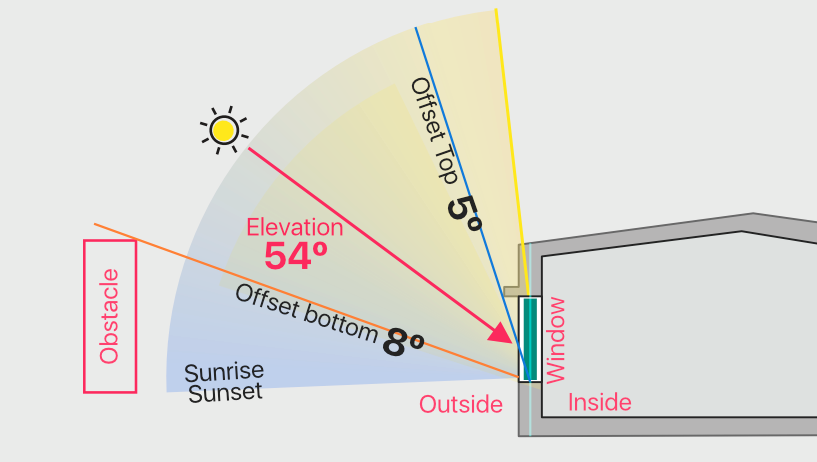
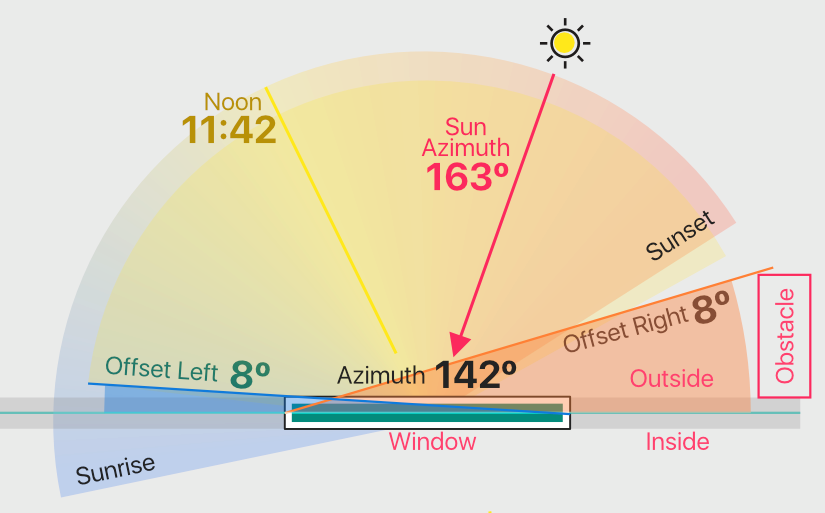
Offset should be set in cases where there are obstacles in the directions of incoming sunlight.
Left / Right azimuth offset
Upper / Lower elevation offset