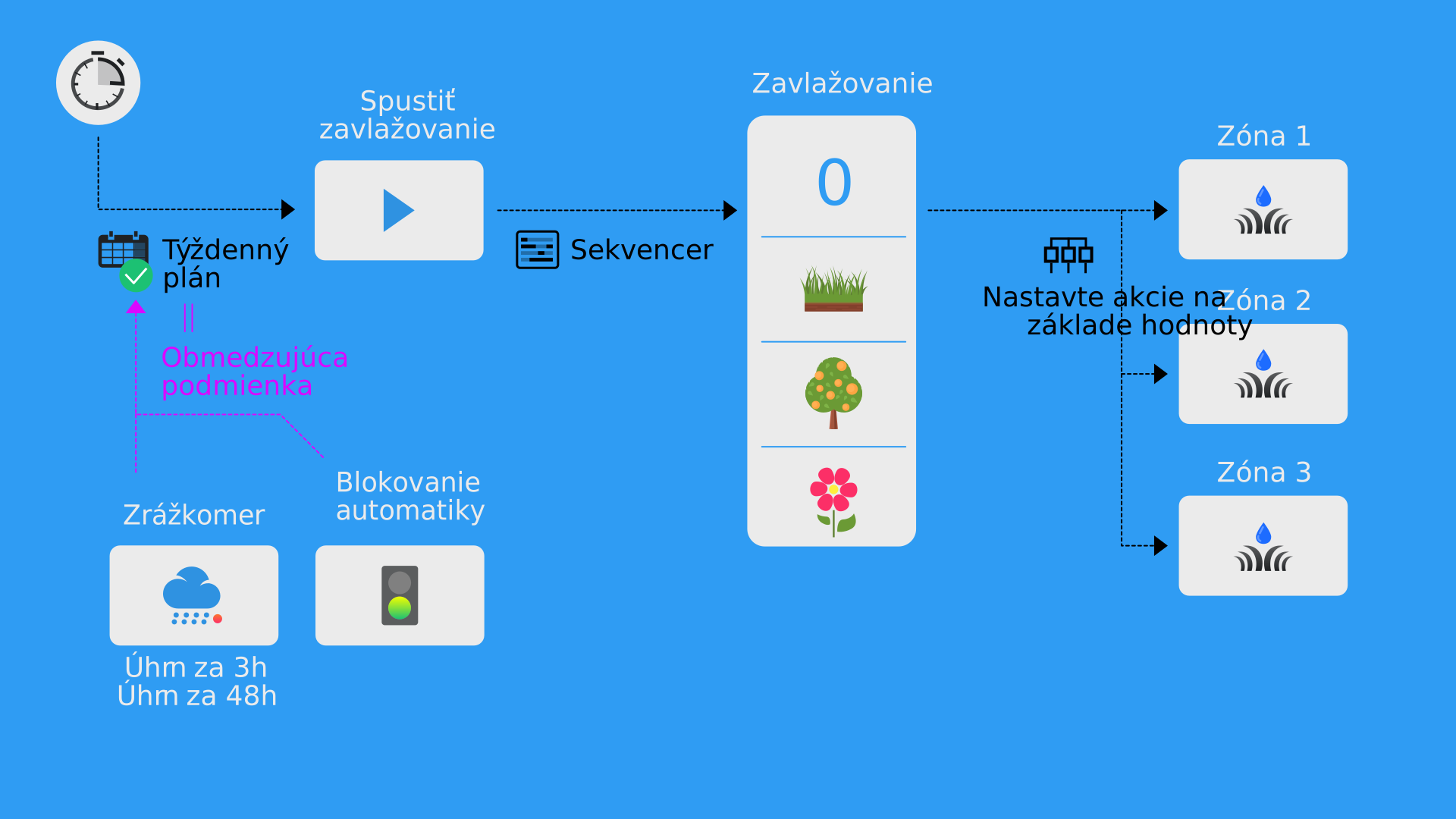
Creating central irrigation control
- Settings → Virtual Devices . Add Device . Select Multi-Value Switch . Name the device “Irrigation”.
- We will design it so that the first value indicates that irrigation is off. The second value can turn on the first zone, the third value another zone, and so on.
- Add a Smart Rule to this device named Set actions based on value of Multi-Value Switch .
- In this Smart Rule, set actions for the individual irrigation valves. That is, if the value is off for the central control virtual device, then set all irrigation valves to the Off action. If the value is 1, then set the irrigation valves so that 1 is On and the others are Off. Do this for all zones.
- On the virtual device “Irrigation”, also set Manual override to Keep manual mode for a limited time , for example 20 minutes. This ensures that if a user accidentally switches irrigation manually to any of the zones, after 20 minutes it returns from manual mode back to automation, i.e., to the Off state.
Creating an irrigation sequence
- Now create a new virtual device of type Push button named “Run irrigation”.
- Create a Smart Rule Sequencer , and set this “Run irrigation” button as the Start .
- Each step of the sequencer will use the Multi-Value Switch , which we named “Irrigation” in the previous step.
- Set a duration for each sequence, i.e., how long we want to irrigate that zone.
- As the last step, set the sequencer for irrigation to value 0, i.e., to Off.
Blocking automatic irrigation
Blocking automatic irrigation can be configured, for example, using a manual switch that we create as a virtual switch, and using rainfall measurement. More information on the page Rain measurement.
Creating manual blocking
- Settings → Virtual Devices → Add Device → Digital output .
- Name: “Blocking automatic irrigation”.
- Text for On State : “Blocked”.
- Text for Off State : “Active”.
- Set icons to make it intuitive.
Automatic irrigation triggering
- Create a Smart Rule Weekly schedule , which will press the “Run irrigation” button at regular times.
- In the weekly plan, also set Limiting condition . Set it to type Formula .
- As variables, insert three values:
- Blocking automatic irrigation (
Block) - Rainfall volume, sum over 3h (
Rainfall_3h) - Rainfall volume, sum over 48h (
Rainfall_48h)
- Blocking automatic irrigation (
- The formula will then look as follows:
| |