Expressions / Script language

Multi-line scripting language with syntax highlighting, usable in smart rules Equation, Formula and Script, and also in Modbus and Packet parser interfaces.
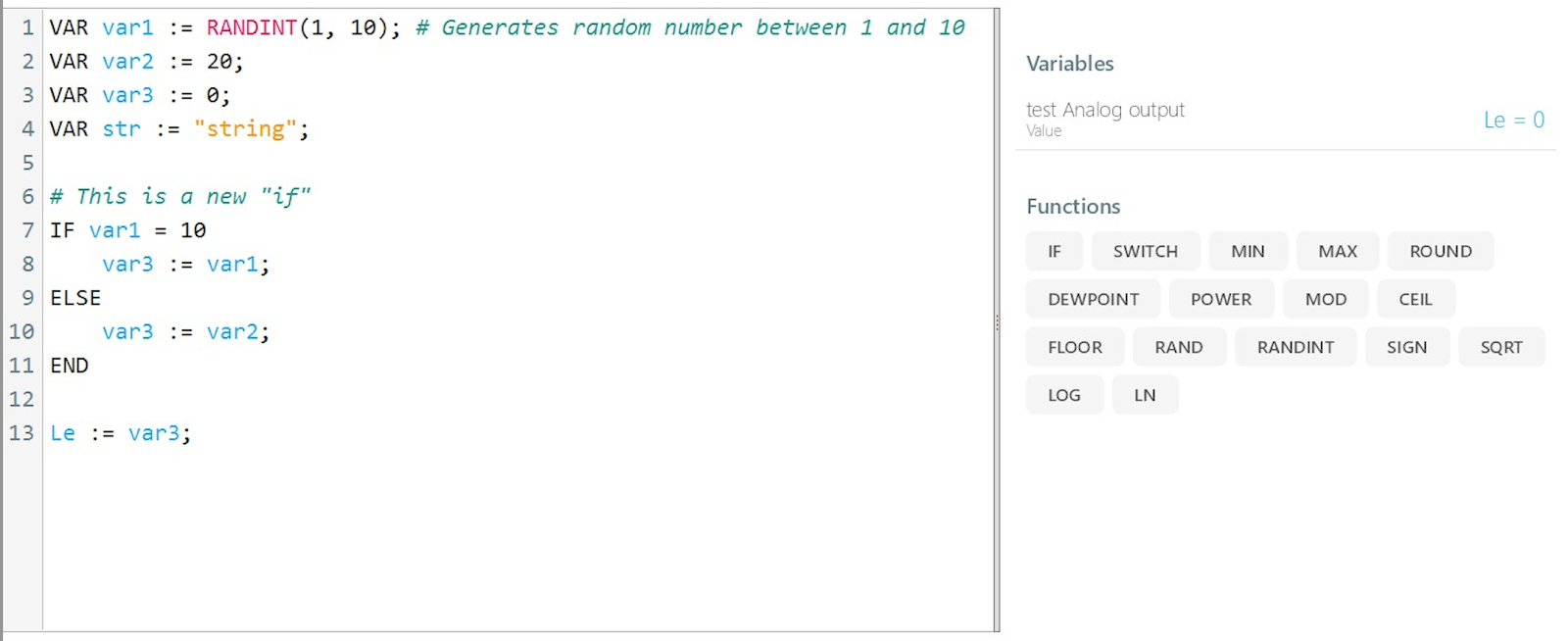
Basics
Association
| |
Multi-line algorithm
Each line is divided by semicolon
| |
Returned value
- Result of last line of code
- RETURN(expression) stops execution of algorighm and returns content inside brackets
| |
Temporary variable
Lives within the single execution of the script.
| |
IF clause
Excel style
| |
Multi-line style
| |
Switch
Tests an expression against a list of cases and returns the corresponding value of the first matching case, with a default value if nothing else is met.
| |
Example:
| |
Loop
LOOP / WHILE … repeats a series of commands based on a specified condition until that condition is met. CONTINUE … skips the execution of commands and continues to the next cycle. BREAK … terminates the loop.
Example with condition at the beginning:
| |
Example with condition at the end:
| |
NaN (not a number) value
NaN can be returned as a value in case real value is not known.
| |
ISNAN(expression) function Returns TRUE if expression is not a number.
ISNULL
Returns true if the parameter is NULL, false otherwise. Used for String and Bytearray types. Example: if XML element is not found, returned value ISNULL.
The syntax of the function is:
| |
Sleep
Sleeps the script for number of miliseconds. Use only in very specific cases.
| |
Comments
New line starting with character #
| |
Numeric literals
Hexadecimal numbers
Expressions can also interpret hexadecimal numbers. Prefix 0x is required and the rest is not case sensitive.
0x0A = 10
| |
Binary numbers
0b1010 = 10
| |
Mathematical expressions
+, -, *, /
| |
Logical expressions
AND, OR, !, =, !=, >, <
| |
Functions
LINEAR
Returns linearly adjusted value – linear interpolation.
| |
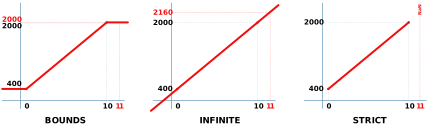
Parameters - input… input value - value1_input… value at the input at the lower limit - value1_output… value at the output at the lower limit - value2_input… value at the input at the upper limit - value2_output… value at the output at the upper limit - [type]… optional parameter. Defines what the result should be when the input value is out of range value1_input ↔︎ value2_input: - without parameter (same as with parameter BOUNDS)… If the input value is outside the defined range, the output value will be one of the extremes (minimum or maximum) - INFINITE… If the input value is outside the defined range, the result is an extrapolated value - STRICT… If the input value is outside the defined range, the output value will be NaN (not a number)
Examples
| |
Examples for different [type] attributes: - input = 11 - value1_input = 0, value1_output = 400 - value2_input = 10, value2_output = 2000 - result for different [type] parameters: - BOUNDS (default value) = 2000 - INFINITE = 2160 - STRICT = NaN
HYSTERESIS
Hysteresis can be used to filter signals so that the output reacts less rapidly than it otherwise would by taking recent system history into account. For example, a thermostat controlling a heater may switch the heater on when the temperature drops below A, but not turn it off until the temperature rises above B.
Returns 0 or 1.
| |
Example: maintain a temperature of 20 °C within 2 ºC hysteresis range. Turn the heater on when the temperature drops to below 18 °C and off when the temperature exceeds 22 °C).
| |
Mathematical functions
MIN
The MIN function returns the minimum of the provided numeric values. It accepts between 1 and 100 arguments or a single collection. NaN and NULL values are ignored.
| |
Examples:
| |
MINSTRICT
The MINSTRICT function returns the minimum of the provided numeric values. It accepts between 1 and 100 arguments or a single collection. If any of the provided values is NaN or NULL, the function returns NaN/NULL.
| |
Examples:
| |
MAX
The MAX function returns the maximum of the provided numeric values. It accepts between 1 and 100 arguments or a single collection. NaN and NULL values are ignored.
| |
Examples:
| |
MAXSTRICT
The MAXSTRICT function returns the maximum of the provided numeric values. It accepts between 1 and 100 arguments or a single collection. If any of the provided values is NaN or NULL, the function returns NaN/NULL.
| |
Examples:
| |
AVG
The AVG function calculates the average (mean) of the provided numeric values. It accepts between 1 and 100 arguments or a single collection. NaN values are ignored.
| |
Examples:
| |
AVGSTRICT
The AVGSTRICT function calculates the average (mean) of the provided numeric values. It accepts between 1 and 100 arguments or a single collection. If any of the provided values is not a number, the function returns NaN.
| |
Examples:
| |
ROUND
| |
Returns the rounded value.
| |
ABS
The ABS function returns the absolute value (i.e. the modulus) of any supplied number.
| |
Examples:
| |
DEWPOINT
| |
Returns the dew point temperature given the current temperature and relative humidity. Dew point is calculated according to this equation.
| |
POWER
The POWER function calculates a given number, raised to a supplied power.
| |
Examples:
- POWER(2,3) … 2^3 = 8
- POWER(10, -3) … 0,001
- POWER(25, 0) … 1
MOD
The MOD function returns the remainder of a division between two supplied numbers.
| |
Arguments:
- number - The number to be divided.
- divisor - The value that the number argument is divided by.
Examples:
- MOD(6, 4) … 2
- MOD(6, 2.5) … 1
CEIL
The CEIL function rounds a supplied number away from zero, to the nearest multiple of a given number.
| |
Arguments:
- number - The number that is to be rounded.
- significance (optional) - The multiple of significance that the supplied number should be rounded to. If the significance is not specified, then it is equal to 1. (This should generally have the same arithmetic sign (positive or negative) as the supplied number argument)
Examples:
- CEIL(22.25,0.1) … 22.3
- CEIL(22.25,1) … 23
- CEIL(22.25) … 23
- CEIL(-22.25,-1) … -23
- CEIL(-22.25,1) … -22
- CEIL(-22.25) … -22
- CEIL(-22.25,-5) … -25
FLOOR
The FLOOR function rounds a supplied number towards zero to the nearest multiple of a specified significance.
| |
Arguments:
- number - The number that is to be rounded.
- significance (optional) -The multiple of significance that the supplied number is to be rounded to. If the significance is not specified, then it is equal to 1. (This should generally have the same arithmetic sign (positive or negative) as the supplied number argument)
Examples:
- FLOOR(22.25,0.1)… 22.2
- FLOOR(22.25,1) … 22
- FLOOR(22.25) … 22
- FLOOR(-22.25,-1) … -22
- FLOOR(-22.25,1) … -23
- FLOOR(-22.25) … -23
- FLOOR(-22.25,-5) … -20
RAND
The Rand function generates a random real number between 0 and 1.
| |
Examples:
- RAND()
RANDINT
The RANDINT function generates a random integer between two supplied integers.
| |
Examples:
- RANDINT(1,5)
- RANDINT(-2,2)
SIGN
The SIGN function returns the arithmetic sign (+1, -1 or 0) of a supplied number. I.e. if the number is positive, the SIGN function returns +1, if the number is negative, the function returns -1 and if the number is 0 (zero), the function returns 0.
| |
Examples:
- SIGN(100) … 1
- SIGN(0) … 0
- SIGN(-100) … -1
SQRT
The SQRT function calculates the positive square root of a supplied number.
| |
Examples:
- SQRT(25) … 5
LOG
The LOG function calculates the logarithm of a given number, to a supplied base.
| |
Arguments:
- number - The positive real number that you want to calculate the logarithm of.
- base (optional) - An optional argument that specifies the base to which the logarithm should be calculated. If the argument is not specified, then the base argument uses the default value 10.
Examples:
- LOG(4,0.5) … -2
- LOG(100) … 2
LN
The LN function calculates the natural logarithm of a given number.
| |
where the number argument is the positive real number that you want to calculate the natural logarithm of.
Examples:
- LN(100) … 4,60517
Bit operations
GETBIT
Returns a value of a bit in the specified position.
| |
Arguments:
- number - number to extract value of specific bit from
- bit_position - position of bit, starting with 0, from right
Examples:
- GETBIT(2, 0) → first bit of number 2 (0b0010) is 0
- GETBIT(4,2) → third bit of number 4 (0b0100) is 1
GETBITS
Returns value of specified number of bits in the specified position.
| |
Examples:
- GETBITS(216, 3, 2) → number 216 = 0b1101 1000; value of 4th bit from the right is 1, 5th bit is 1, therefore result is 0b0011 = 3
- GETBITS(0xFF, 0, 4) → number 0xFF = 255 = 0b1111 1111; value of first 4 bits from right is 0b1111 = 0xF = 15
GETBYTE
Returns a value of a byte in the specified number.
| |
Arguments:
- number - number to extract value of specific byte from
- byte_position - position of byte, starting from 0, from right
Examples:
| |
SETBYTE
Assigns a new value to the specified byte in the provided number, and returns assigned value.
| |
Examples:
| |
SETBIT
Assigns a new value to the specified bit in the provided number and returns a new number.
| |
Arguments:
- number - number to be modified
- bit_position - position of bit, starting with 0, from right
- new_value - 0 or 1 - value that is going to be set to specified bit
Examples:
- SETBIT(1, 1, 1) → 3
- SETBIT(3, 1, 1) → 3
- SETBIT(4, 2, 0) → 4
- SETBIT(12, 1, 0) → 14
SETBITS
Assigns a new value to the specified bits in the provided number and returns a new number.
| |
Examples:
- SETBITS(192, 4, 2, 3) → 240
- SETBITS(192, 5, 2, 3) → 224
« (LEFT BIT SHIFT)
| |
Excel: BITLSHIFT(number, shift_amount)
» (RIGHT BIT SHIFT)
| |
Excel: BITRSHIFT(number, shift_amount)
& (BITWISE AND)
| |
Excel: BITAND(number1, number2)
| (BITWISE OR)
| |
Excel: BITOR(number1, number2)
See the example of bit operations in Google Sheets: https://docs.google.com/spreadsheets/d/1hF5FMpGMJbgYh-YLwWrq2n186_ATyGyLUb689__IhLY/edit?usp=sharing
Or try interactive tool at http://bitwisecmd.com/
Text, String and Byte array
LENGTH
Returns length of an object or number of bytes. Object can be a number, boolean, string or Collection.
| |
Examples:
| |
BYTECOLLECTION
Creates a Collection
| |
Examples:
| |
INDEXOF
Returns index of specified element in string or collection. Returns -1 if element cannot be found.
| |
Examples:
| |
COPY
Copies specified string or collection (or part of them)
| |
Examples:
| |
REPLACE
Returns a new string or collection, in which all occurrences of specified value are replaced with new value.
| |
Examples:
| |
SPLIT
Splits string to substrings based on separator parameters.
| |
Examples:
| |
COMPARE
Compare 2 strings and returns an integer that indicates their relative position in the sort order.
| |
Examples:
| |
APPEND
Append value to collection or string and returns new object with appended value.
| |
Examples:
| |
INSERT
Insert value to collection or string. Returns collection or string with inserted value.
| |
Examples:
| |
REMOVEAT
Remove elements from collection or string based on element index and length. Returns collection or string without specified elements.
| |
Examples:
| |
GETAT
Get element value from collection or string based on provided index.
| |
Examples:
| |
SETAT
Set element value in collection or string at provided index.
| |
Examples:
| |
ENCODE
Encodes specified string using on of the formats and returns the new string.
| |
Supported formats:
- XML
- Base64
Examples:
| |
DECODE
Decodes specified string using one of the formats and returns the new string.
| |
Supported formats:
- XML
- Base64
Examples:
| |
EQUALS
Compares two numbers with floating point. The numbers are considered to be equal if | n1 - n2 |< epsilon The default value of threshold (*epsilon) *is 0.005 and it is an optional parameter.
| |
Examples:
| |
Sorting
There are multiple ORDER variants available: Ascending - ORDER, ORDERSTRICT - ORDERINDEX, ORDERINDEXSTRICT Descending - ORDERDESC, ORDERDESCSTRICT - ORDERINDEXDESC, ORDERINDEXDESCSTRICT
ORDER
The ORDER function sorts the provided input values in ascending order and returns them in a new collection. It accepts n values (up to 100 arguments) or a single collection. Values do not need to be numeric, but they must be comparable (e.g., numbers, TIMESPAN, DATETIME, strings). Mixed types (e.g., numbers and strings) are not allowed. NaN and NULL values are ignored and excluded from the returned collection.
| |
Examples:
| |
ORDERINDEX
The ORDERINDEX function sorts the provided input values in ascending order, similar to the ORDER function. However, instead of returning the sorted values, it returns a collection of indexes indicating the positions of the original values in sorted order. It accepts n values (up to 100 arguments) or a single collection. Values do not need to be numeric, but they must be comparable (e.g., numbers, TIMESPAN, DATETIME, strings). Mixed types (e.g., numbers and strings) are not allowed. NaN and NULL values are ignored and excluded from the returned collection.
| |
Examples:
| |
ORDERSTRICT
The ORDERSTRICT function sorts the provided input values in ascending order and returns them in a new collection. It accepts n values (up to 100 arguments) or a single collection. Values do not need to be numeric, but they must be comparable (e.g., numbers, TIMESPAN, DATETIME, strings). Mixed types (e.g., numbers and strings) are not allowed. NaN and NULL values are included and always sorted first in the result.
| |
Examples:
| |
ORDERINDEXSTRICT
The ORDERINDEXSTRICT function sorts the provided input values in ascending order, similar to the ORDERSTRICT function. However, instead of returning the sorted values, it returns a collection of indexes indicating the positions of the original values in sorted order. It accepts n values (up to 100 arguments) or a single collection. Values do not need to be numeric, but they must be comparable (e.g., numbers, TIMESPAN, DATETIME, strings). Mixed types (e.g., numbers and strings) are not allowed. NaN and NULL values are included and always sorted first in the result.
| |
Examples:
| |
ORDERDESC
The ORDERDESC function sorts the provided input values in descending order and returns them in a new collection. It accepts n values (up to 100 arguments) or a single collection. Values do not need to be numeric, but they must be comparable (e.g., numbers, TIMESPAN, DATETIME, strings). Mixed types (e.g., numbers and strings) are not allowed. NaN and NULL values are ignored and excluded from the returned collection.
| |
Examples:
| |
ORDERINDEXDESC
The ORDERINDEXDESC function sorts the provided input values in descending order, similar to the ORDERDESC function. However, instead of returning the sorted values, it returns a collection of indexes indicating the positions of the original values in sorted order. It accepts n values (up to 100 arguments) or a single collection. Values do not need to be numeric, but they must be comparable (e.g., numbers, TIMESPAN, DATETIME, strings). Mixed types (e.g., numbers and strings) are not allowed. NaN and NULL values are ignored and excluded from the returned collection.
| |
Examples:
| |
ORDERDESCSTRICT
The ORDERDESCSTRICT function sorts the provided input values in descending order and returns them in a new collection. It accepts n values (up to 100 arguments) or a single collection. Values do not need to be numeric, but they must be comparable (e.g., numbers, TIMESPAN, DATETIME, strings). Mixed types (e.g., numbers and strings) are not allowed. NaN and NULL values are included and always sorted first in the result.
| |
Examples:
| |
ORDERINDEXDESCSTRICT
The ORDERINDEXDESCSTRICT function sorts the provided input values in descending order, similar to the ORDERDESC function. However, instead of returning the sorted values, it returns a collection of indexes indicating the positions of the original values in sorted order. It accepts n values (up to 100 arguments) or a single collection. Values do not need to be numeric, but they must be comparable (e.g., numbers, TIMESPAN, DATETIME, strings). Mixed types (e.g., numbers and strings) are not allowed. NaN and NULL values are included and always sorted first in the result.
| |
Examples:
| |
Date and time
DATETIME
Creates a DateTime object. DateTime.Ticks property is number of milliseconds from 1.1.0001 00:00:00.000. DateTime has properties: TICKS, YEAR, MONTH, DAY, DAYOFWEEK, DAYOFYEAR, HOUR, MINUTE, SECOND, MILLISECOND, KIND, UTCDATETIME, LOCALDATETIME, UNIXTIME
| |
Examples:
| |
NOW
Returns DateTime object that is set to current date and time in local timezone.
| |
Examples:
| |
TIMESPAN
The TIMESPAN function creates a variable that represents a duration of time, specified in terms of days, hours, minutes, seconds, and milliseconds. The TIMESPAN has properties to directly access each component of the timespan: DAYS, HOURS, MINUTES, SECONDS, MILLISECONDS. The TIMESPAN has properties to access the total value of time in specific units (including fractional values): TOTALDAYS, TOTALHOURS, TOTALMINUTES, TOTALSECONDS, TOTALMILLISECONDS
| |
Examples:
| |
LOCALTIMEZONE
Returns local timezone as number of milliseconds from UTC time.
| |
Examples:
| |
DATETIMEADD
Adds specified number of years, months, days, hours, minutes, seconds, milliseconds to existing DateTime and returns a new DateTime.
| |
Examples:
| |
Data type conversions
TODOUBLE
Converts string to number. Returns NaN on error.
| |
Examples:
| |
TOSTRING
Returns a string value of the specified value or Collection according to the specified encoding. Encoding is optional (iso-8859-1 is used by default).
| |
Examples:
| |
| |
TOBCD
Converts the provided number to the binary-coded decimal (BCD) format. The scheme of encoding is BCD-8421.
| |
Examples:
| |
FROMBCD
Decodes the provided number, that is encoded in binary-coded decimal (BCD) format. The scheme of encoding is BCD-8421.
| |
Examples:
| |
TOBYTEARRAY
Converts string to byte array according to the specified encoding. Encoding is optional (iso-8859-1 is used by default).
| |
Examples:
| |
RGBTOHSV
Converts RGB color definition; returns color in Hue / Saturation / Brightness format.
| |
Example:
| |
HSVTORGB
Converts color defined by Hue / Saturation / Brightness; returns color in RGB format
| |
Example:
| |
Parsing functions
PARSETEXT
Returns part of input text, based on left and right search patterns
| |
Examples:
| |
PARSEJSON
Returns value of element from json formatted string. Element is specified with json path.
| |
Examples:
With json =
| |
| |
PARSEXML
Returns value of element from xml string. Element is specified with xml path.
| |
Examples:
With xml=
| |
| |
If xml contains namespaces, you have to fully specify element names with namespace, eg. PARSEXML(xml, “//DIDL-Lite:container[dc:title=‘My Playlist’’]/DIDL-Lite:res”);
Packet parser
For more information, see the page about Packet parser
SENDHTTPREQUEST
SENDDATA
MQTTPUBLISH
FTPDOWNLOAD
FTPUPLOAD
COMPLETESERVICEATTRIBUTE
COMPLETESERVICEACTION
Modbus
Modbus